
Running a cutter head at max velocity into dense white oak will quickly destroy a good bit and ruin expensive stock. Over 25 years on the bench, I've seen too many apprentices scorch figured boards simply because they never bothered adjusting dial settings. Mastering handling speed settings for timber densities keeps your cuts true, protects your motor, and prevents nasty kickback. Set your variables before you ever touch the power switch.
The Mechanics of Handling Speed Settings for Timber Densities
Wood isn't uniform. Soft white pine yields instantly under a sharp edge, while kiln-dried hard maple fights every millimeter of travel. When you pair a high-density board with excessive spindle speeds, friction outpaces chip clearance. The cutter rubs instead of slicing, burning the stock within seconds and dulling the cutting faces.
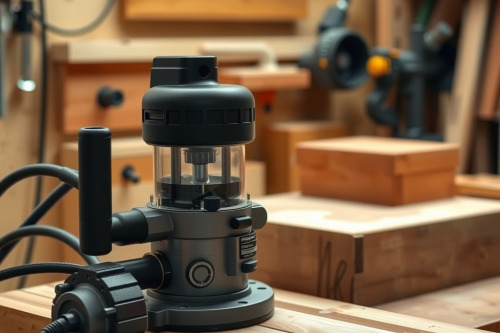
A modern variable speed wood router exists for this specific balance. You must match the rotational velocity of the bit to the rate at which flutes clear waste. If you run a high RPM on an ultra-dense exotic, heat builds up rapidly in the workpiece and cooks the tool steel. Dialing down the motor preserves tool life and gives the cutter breathing room to clear chips cleanly.
Softwoods vs Hardwoods: Matching RPM to Species Density
Species density dictates the resistance your machine encounters during a pass. Working with low-density stock like Western red cedar allows higher RPM, typically between 18000 and 22000 RPM for small cutters. The cutters eject large, soft chips easily without bogging the motor down.
Adjusting Router RPM for Dense Hardwoods
Shift to dense hardwood routing in species like hickory, jarrah, or sugar maple, and you must drop your speed. Run a 12mm straight bit through hard maple at 24000 RPM, and you will hear a screaming whine right before scorch marks appear. Reduce the speed dial to 14000 or 16000 RPM. This adjustment maintains chip thickness, keeps the tool cool, and eliminates unsightly tear-out along erratic grain lines.
Varying Passes for Mixed Grain
End grain exposes cell structures that resist cutting heads aggressively. When cutting mortises or end-grain tenons in dense timber, lower the motor speed by roughly 10% to 15% compared to your standard face-grain settings. Pair that adjustment with a shallower profile depth per pass to prevent internal fractures in brittle timber.
Bit Diameter and Speed Calculations
Rim speed determines cutting action. A 6mm edge-forming bit spins at a vastly lower peripheral velocity than an 80mm raised-panel bit running at the identical RPM. Disregarding bit diameter and speed relationships invites severe safety hazards.
Large cutters generate immense centrifugal force. If you spin a large horizontal crown or panel raiser past 12000 RPM, you generate violent bit chatter that ruins your workpiece and can unseat the bit. Keep smaller profiling bits between 18000 and 20000 RPM, but drop large-diameter cutters down to 8000 to 10000 RPM. Quality tungsten carbide edges will shear smoothly at these reduced speeds without losing balance.
Critical Operational Pitfalls: Collet Slip and Feed Rate
Speed control relies directly on feed rate management. Push too slowly, and the cutters dwell in one spot, generating excess friction and burning the stock. Push too fast, and the motor lugs down, creating rough, rippled surfaces. Listen to the pitch of the motor; it should maintain a steady hum rather than a labored groan.
Keep an eye on mechanical setup. Dust collection choke packs chips back into the cut path, raising temperatures and causing bit chatter. Clean your extraction ports regularly. Dust packed into the chuck taper causes collet slip, allowing the cutter to creep downward mid-cut and ruin your joint depth. Clean the collet bore with a wire brush every time you switch bits.
Handling Speed Settings for Timber Densities on the Job Site
Job site environments lack the controlled stability of a stationary router table. Handheld passes require extra physical control and deliberate setup. When conducting a wood router review during tool selection, prioritize models that offer mechanical soft-start and electronic feedback circuitry that maintains set RPM under variable loads.
The best wood router for mobile carpentry has a clearly marked speed dial and predictable torque delivery across its full operating spectrum. Test your feed rhythm on scrap offcuts from the exact boards you plan to mill. If you smell toasted wood sugar or notice wisps of smoke, lower the speed dial immediately or increase your feed pace.
Final Workshop Checklist
Proper timber profiling requires discipline before and during the cut. Verify species density on your Janka scale reference before selecting your running speed. Secure your bit shank at least 20mm into the chuck to prevent catastrophic runout, clear the workpiece path of obstructions, and run your extraction at full suction.
Mastering handling speed settings for timber densities turns rough milling into glass-smooth joinery. Adjust your speed dial right now, secure your setup, and make your cuts with clean, deliberate passes.