
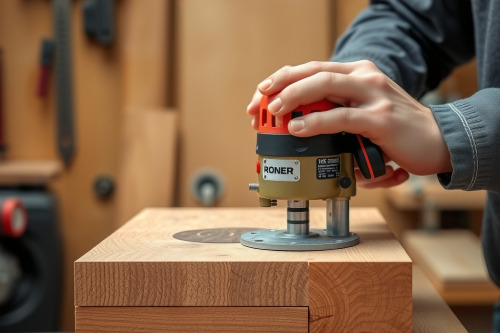
Running a router wide open on dense stock ruins workpieces and destroys tooling rapidly. Over 20 years on commercial job sites, I've seen improper speed settings for timber densities scorch expensive maple and crack custom cutters. You can't treat soft pine and rock-hard hickory with the same dial number. Lock in your operational baseline before you drop that bit into the timber.
Why speed settings for timber densities dictate cut quality
Wood is not an engineered, uniform block of plastic. Every species presents unique cellular density, moisture dynamics, and grain orientation. Dense hardwoods resist the shearing action of rotating flutes with severe physical force. Spinning a cutter at 24000 RPM through dense white oak generates immediate friction, which rapidly dulls your sharp edge.
Balancing peripheral cutter speed and timber resistance
Peripheral tip speed determines how cutters sever wood fibers cleanly. As bit diameter climbs, tip velocity multiplies exponentially at standard motor rotations. Matching your motor output to species density ensures the cutter shears rather than mashes raw grain. Maintaining accurate feed pressure prevents premature heat stress on hardened carbide cutters during heavy passes.
Dialing in hard stock: Avoiding burning the stock and bit chatter
Dense species like hard maple, ipe, and purpleheart demand reduced operational revolutions. Drop your motor speed to roughly 14000 to 18000 RPM for medium profiles in these timbers. Spinning too fast instantly causes burning the stock, leaving black glaze marks that ruin finish prep. You will smell the scorch before you spot the black surface glaze.
Conversely, setting the dial too low under heavy loads induces violent bit chatter. The cutter begins kicking against stiff grain bands instead of slicing clean shavings. Keep your feed steady and listen to the pitch of your variable speed motor. Listen to the tool under load. High-frequency squealing warns you that the RPM is set too high for that species density.
Softwoods and pitch buildup: Managing light timber profiles
Softwoods present entirely different operational hazards. Western red cedar and white pine cut easily, but their loose cell structure yields ugly tear-out along unsupported edges. Dial your wood router back up toward 20000 to 22000 RPM when handling these lighter boards. The rapid slicing action severs soft fibers cleanly before they flex and snap.
Feed rates and clearing chips without dust collection choke
Pine and fir carry heavy resin loads that liquefy under cutter friction. Sticky resin coats bit flutes and clogs tool extraction shrouds on high-production passes. A sudden dust collection choke traps hot chips against the spinning cutter, compounding thermal buildup. Keep your extraction ports clear and maintain swift feed passes to eject chips cleanly.
Bit diameter vs density: Calibrating your wood router
Cutter geometry overrides wood species selection every single time. You can't swing an 80mm raised panel bit at 22000 RPM, even in soft basswood. Massive cutters demand low RPM settings between 8000 and 12000 RPM to keep rim speed within certified safety parameters. Choosing the best wood router for shop casework means selecting a motor with solid electronic speed control under heavy torque.
Always break deep edge profiles into incremental steps. Hogging out a 15mm profile depth in a single pass overburdens the motor and risks catastrophic collet slip. Make 2 or 3 shallower passes, leaving a final 0.5mm skin pass for flawless edge clarity. Read every candid wood router review to evaluate how electronic feedback controls sustain RPM when cutters hit dense end grain knots.
Field adjustments to correct speed settings for timber densities
Dialing the tool correctly requires keen shop observation and swift adjustments. Rippled washboard cuts along the timber flank tell you the feed is too fast or RPM is too low. Smear marks and dark glaze mean your bit is spinning excessively fast for that wood density. Make minor micro-adjustments of 1000 RPM until the machine hums smoothly through the cut.
Watch your chip output constantly. You want crisp, discrete wood chips hitting the guard, not pulverized powdery dust. Powder indicates that the cutter is grinding stock away through excessive RPM, ruining both edge and tool life. Adjust your speed dial promptly when transitioning from flat flatsawn surfaces into dense end grain routing.
Job-site routing protocol
Never rely on factory default dial positions when starting work on custom millwork runs. Evaluate your species density, verify bit shank diameter, and lock the collet down tight. Implement these dialed speed settings for timber densities on scrap cutoffs before touching finished architectural components. Set your speeds correctly now and run your test cuts.